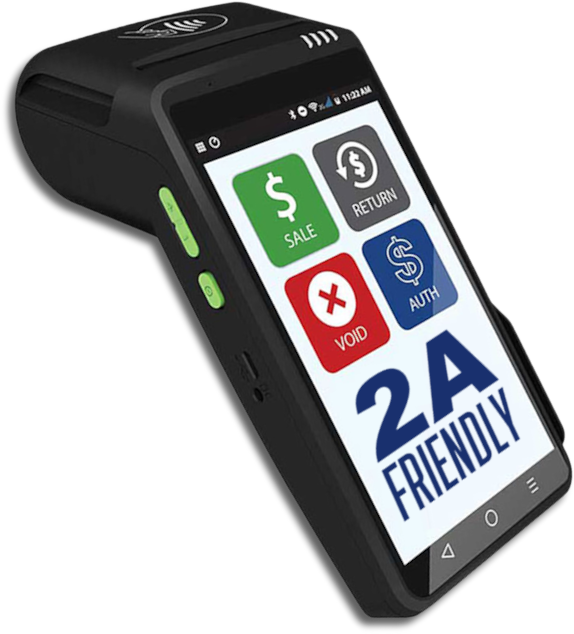

A internet payment gateway is an online commerce application service provider service that authorizes payments for e-businesses, online retailers, bricks and clicks, or traditional brick and mortar. It is the equivalent of a physical point of sale terminal located in most retail outlets. Payment gateways protect credit card, debit card and checking account details by encrypting sensitive information, such as credit card numbers, to ensure that information is passed securely between the customer and the merchant and also between merchant and the payment processor.
PrestaShop comes complete with over 310 features that have been carefully developed to assist business owners in increasing sales with virtually little effort. All features are integrated in the software and are 100% free.
Our merchants can use PrestaShop with the Fastcharge Payment Gateway’s Authorize.net Emulator.
INSTRUCTIONS: After downloading and installing PrestaShop you need to also download the free Authorize.net payment module. Locate the AuthorizeNet Aim Payment Module files in your shopping cart and find the file named VALIDATION.PHP. Open the Valisation.php file in notepad (or any other editor) then change the ‘POST TO’ URL FROM: https://secure.authorize.net/gateway/transact.dll TO: https://trans.secure-fastcharge.com/cgi-bin/authorize.cgi
Depending on the shopping cart version you may need to change the post to URL in 1,2 or 3 places. It’s best to find it everywhere you find it in this file.
Here’s a tip, do a search in the file for “Https:” or “.dll” to help you find the Authorize.net urls to replace with the Emulator Url.
Admin Settings:
Login to your PrestaShop Admin Panel and open the “Payment Methods” setting for Authorizenet. If it gives you a choice select the AIM module because this will allow customers to stay on your site when they purchase from you. Once you get to the settings you can enter the following information:
API Login ID: This is your Fastcharge Account ID (FCXXX)
Transaction Key: This is your Fastcharge “Merchant Pin”
Mode: We always suggest “Live Mode” or “Production Mode”
Gateway URL: If you have this option enter https://trans.secure-fastcharge.com/cgi-bin/authorize.cgi
MD5 Hash: We ignore this field but you can enter “7gt77lyst555r7677yt”
Authorize or Capture: We recommend you select “Authorize and Capture”
Manage a dynamic product list through the PrestaShop back-office. Whether the shop has one product or thousands, this incredible administrative interface let’s you manage the most complex inventory easily with one-click updates. Import and export quickly, set attributes, sort products, bulk discounts, and much more. Managing products has never been easier with PrestaShop.
Automatic Merchant Fraud Protection With the Fast Charge Payment Gateway
In addition to the merchant-initiated protection mechanisms described in this section, several automatic features have been incorporated into the Merchant Fraud Protection module to block out customers exhibiting suspicious buying behaviors, including:
A feature to block a credit card that is submitted and declined twice within 24 hours using different expiration dates.
A feature to check City and State entries for validity against the zip code entered.
A feature to check area codes for validity against the zip code entered.
SSL Technology
Secure Sockets Layer (SSL) technology is the industry-standard method for protecting web communications developed by Netscape Communications Corporation.
The SSL security protocol provides data encryption, server authentication, message integrity, and optional client authentication for a TCP/IP connection. Because SSL is built into all major browsers and web servers, simply installing a digital certificate turns on their SSL capabilities.
SSL comes in two strengths, 40-bit and 128-bit, which refer to the length of the “session key” generated by every encrypted transaction. The longer the key, the more difficult it is to break the encryption code.
Most browsers support 40-bit SSL sessions, and the latest browsers, including Netscape Communicator 4.0, enable users to encrypt transactions in 128-bit sessions – trillions of times stronger than 40-bit sessions.
Using a shopping cart in WordPress is getting very popular and we “DO HAVE” a very simple way for you to use the Fast Charge Payment Gateway.
To determine if you can use Fast Charge just look at the cart’s Payment Gateway list and if you see Authorizenet as a gateway you can use the Fast Charge Payment Gateway using the Authorizenet emulator.
For example purposes these are the instructions for setting up WP onlinestore in your WordPress site.
Step I:
Login to your WordPress admin
Go to the “settings” menu and click on WP onlinestore
On the WP onlinestore menu click on “Merchant Gateways”
Click on Authorizenet
Enter in our test account info shown here
Save Changes
Step II
In your WordPress menu go to “Plugins”
Find WP onlinestore and click “Edit”
In the file list find “authorizenet.php
Open the file
Search for https: and replace each place you find authorizenet.dll with our URL “https://trans.secure-fastcharge.com/cgi-bin/authorize.cgi”
Save the File
Now your WordPress WP onlinestore is ready for you to finish setting up your products etc.. Once you have an active Fast Charge account you can change the test account ID to your real account ID then you’re all done.
For any other WordPress shopping cart the steps are pretty much the same except the set up locations in your menu may be located in a different area on your menu.
INSTRUCTIONS: Locate the Authorize.Net Aim Payment Module in your shopping cart and change the ‘POST TO’ URL FROM: https://secure.authorize.net/gateway/transact.dll TO: https://trans.secure-fastcharge.com/cgi-bin/authorize.cgi
Depending on the shopping cart and it’s payment module you may need to change the post to URL in 1,2 or 3 places. It’s best to find the AIM payment module and then change it everywhere in this file.
Here’s a tip, do a search in the AIM file for “.dll” to help you find the Authorize.net urls to replace with the emulator url.
Admin Settings:
Login to your Admin Panel and open the “Payment Methods” setting for Authorizenet. If it gives you a choice select the AIM module because this will allow customers to stay on your site when they purchase from you. Once you get to the settings you can enter the following information:
API Login ID: This is your fastcharge Account ID (FCXXX)
Transaction Key: This is your Fastcharge “Merchant Pin”
Mode: We always suggest “Live Mode”
Gateway URL: If you have this option enter https://trans.secure-fastcharge.com/cgi-bin/authorize.cgi
MD5 Hash: We now ignore this but you can enter “7gt77lyst555r7677yt”
Authorize or Capture: We recommend you select Authorize and Capture
These are some of the most common carts that the emulator has been proven to work on:
Magento
OpenCart
ShopSite
VirtueMart
WordPress + Onlinestore
Zen Cart
OsCommerce
Joomla
NOTE: eShop no longer supports U.S. Merchant Gateways
There are thousands of shopping carts and e-commerce systems that allow you to use the emulator and if you have any questions or need help please give us a call at (800) 757 5453.
As far as we know there are now over 5250 shopping carts that work with the Fast Charge Payment Gateway™. Since there are so many please call us at 1-800-757-5453 and we can answer specific questions about your cart.
The following shopping carts all work very well with Fast Charge:
The GemCart
The GemCart is a powerful open-source software. 1) the FREE version that you can download and run on your server and the 2) Pro OnDemand version which provides cart, hosting, ssl and free chat, advanced catalog tools, integration with Campaign Monitor, eBay, etc.
Instructions for setting up FastCharge module installed on The GemCart:
Login to your GemCart Admin
Click Modules, Click Payment
If not installed, click Install Modules and install Fastcharge.
Once installed, click Edit and, Account ID: Enter Your Fast Charge Account ID (FCxxx)
Transaction Key/Merchant Pin: Enter Your Merchant Pin Number (You can find this under your FRISK settings in Fast Charge).
Choose a single- or multipage checkout, along with custom colors, fields, and buttons.
Select your preferences, and your shopping cart and checkout pages will be created automatically — no coding required.
Sell downloadable products like software, music, or gift certificates.
Add tracking codes to the checkout process to keep track of important purchase data.
Zencart
Zencart is open source meaning it’s free to download and install. It is also available with thousands of webhosting accounts as a free “one click” addon. They do have a paid support service and will install the shopping cart on any website for a small fee. Because this cart is so popular it is very easy to find a webdesigner to customize it. Zencart is basically oscommerce with all the bells and templates any merchant could use. It has every shipping module, marketing module, pricing schemes, discounts, google adwords tracking, affiliate tracking, coupons and thousands of templates with many of them free. To install the Fastcharge payment module it takes about 2 minutes for any novice to get up and running. Zencart is also portable and can be easily moved from one webhost to another in minutes.
Sun Shop
The most comprehensive PHP ecommerce software in its class, SunShop includes everything you need to build your online storefront, market your products, take orders, accept customer payments, manage your inventory, track shipments, and MORE.
Oscommerce is the original open source shopping cart and has 60,000 custom addons developed by users. We used to recommend Oscommerce until we received so much good feedback about Zencart. The difference between oscommerce and Zencart is that Zencart comes with many bells and whistles already installed. Oscommerce has more addons but most of them require advanced coding which the average merchant has trouble with.
OpenCart
OpenCart is an open source shopping cart that has very advanced features such as ? multi currency, multi languages and product reviews etc.. OpenCart makes their money providing support and addon services etc.. They have very good support but a programmer will probably be required to get it installed.
Volusion
Build and manage your online store with a shopping cart software that’s full of easy-to-use tools – no programming skills required. Give your site a design that’s sure to impress. Simply apply your favorite template with just a click of the mouse.
Instructions for setting up Volusion:
Login to your Volusion Admin
Under gateways select “other”
Type in “Merchantpartners”
Custom Field #1: Enter Your Fast Charge Account ID (FCxxx)
Custom Field #2: Enter Your Merchant Pin Number (You can find this under your FRISK settings in Fast Charge)
Custom Field #3: Leave Blank
Click Save/Update and you’re all set up
ShopSite
Shopsite is a very good “Paid Cart” that also has a “One Click” activation setting in their admin settings. The downside to Shopsite is it’s a little more expensive and not for entry level or growing merchants unless they are prepared to spend a little bit per month for their webhosting but it is very good.
VirtueMart
VirtueMart is a very “hot” Open Source E-Commerce solution to be used together with a Content Management System (CMS) called Joomla!. Joomla! and VirtueMart are written in PHP and can be used in typical PHP/MySQL environments. VirtueMart is what the pros use instead of WordPress for their content delivery and database management. To use the Fastcharge Payment Gateway with Virtuemart/Joomla there are several options. There is a free module on the Virtuemart support forum, a paid “one click” module for a small fee and the option to use the authnet emulator.
WordPress
WordPress is a free blog and website publishing program that now has hundreds of shopping carts available as a plugin. Any of these plugins can be edited to work with Fastcharge and very little programming is needed. However, there’s a note of caution about WordPress plugins. Most of these are free to install but most of them require some type of paid service or upgrade to get them to work correctly or only allow a few products.
Magento
Magento is a “free to install” cart that has many features available and is used by many very large companies. It started as an open source shopping cart that has evolved into a pay as you go cart. If a merchant downloads or installs Magento they need to have advanced programming skills or be prepared to pay them for help. We only recommend them because their order management system for larger companies highly recommended by direct marketing, direct mail and very large companies. Magento has the ability receive direct feeds from UPS or Fedex for package tracking and returns etc..
Joomla
Joomla is one of the world’s most popular open source CMS (content management systems). With millions of websites running on Joomla, the software is used by individuals, small & medium-sized businesses, and large organizations worldwide to easily create & build a variety of websites & web-enabled applications. To use the Fastcharge Payment Gateway with Joomla there are several options. There is a free module on the Virtuemart support forum, a paid “one click” module for a small fee and the option to use the authnet emulator. There are also many developer forums where users have posted their Fastcharge Joomla payment module for users to download for free.
Fastcharge Payment Gateway
The Fast Charge Payment Gateway™ also has what’s called an Authorize Net Emulator. Any shopping cart that uses Authorize Net will work with Fast Charge if you can use the emulator.
Admin Settings:
Login to your shopping cart’s Admin Panel and open the “Payment Methods” setting. If it gives you a choice select the Authorize Net AIM module because this will allow customers to stay on your site when they purchase from you. Once you get to the settings page you can enter the following information:
API Login ID: This is your fastcharge Account ID (FCXXX)
Transaction Key: This is your Fastcharge “Merchant Pin”
Mode: We always suggest “Live Mode”
Gateway URL: If you have this option enter https://trans.secure-fastcharge.com/cgi-bin/authorize.cgi
MD5 Hash: We now ignore this but you can enter “7gt77lyst555r7677yt”
Authorize or Capture: We recommend you select Authorize and Capture
NOTE: A much easier and faster way to integrate a shopping cart is to use our Authorizenet Emulation.
DESCRIPTION:The Authorize.Net Emulator allows merchants to use the Authorize.Net payment module that is available in most third party shopping carts. Simply change the ‘POST TO’ URL within the Authorize.Net payment module to point to Fastcharge’s gateway and your account will be up and running within a few minutes.
INSTRUCTIONS: Locate the Authorize.Net Aim Payment Module in your shopping cart and change the ‘POST TO’ URL FROM: https://secure.authorize.net/gateway/transact.dll TO: https://trans.secure-fastcharge.com/cgi-bin/authorize.cgi
Depending on the shopping cart and it’s payment module you may need to change the post to URL in 1,2 or 3 places. It’s best to find the AIM payment module and then change it everywhere in this file.
Here’s a tip, do a search in the AIM file for “.dll” to help you find the Authorize.net urls to replace with the emulator url.
Admin Settings:
Login to your Admin Panel and open the “Payment Methods” setting for Authorizenet. If it gives you a choice select the AIM module because this will allow customers to stay on your site when they purchase from you. Once you get to the settings you can enter the following information:
API Login ID: This is your fastcharge Account ID (FCXXX)
Transaction Key: This is your Fastcharge “Merchant Pin”
Mode: We always suggest “Live Mode”
Gateway URL: If you have this option enter https://trans.secure-fastcharge.com/cgi-bin/authorize.cgi
MD5 Hash: We now ignore this but you can enter “7gt77lyst555r7677yt”
Authorize or Capture: We recommend you select Authorize and Capture
These are some of the most common carts:
Magento
Aspdotnet
OpenCart
ShopSite
VirtueMart
CS-Cart
Go Daddy WHMCS Cart
Blesta (Client Management Billing System)
WordPress + Shopp
WordPress + eStore
Zen Cart
3dCart
X-Cart
Interspire
CRE Loaded
Tomato Cart
1Shopping Cart
Mals E
SunShop
PDG Soft
Prestashop
AgoraCart
Storesprite
UberCart
ZenMagick
TomatoCart
DigiStore
Pinnacle Cart
eCommerce Templates
SpreeCommerce
ZeusCart
JadaSite
Ecommerce Shopping Cart
jCart
CF Shopkart
DashCommerce
ASP.Net
Idut Shop
OsCommerce
Joomla
There are thousands of shopping carts and ecommerce systems that allow you to use the emulator and if you have any questions or need help please give us a call at (800) 757 5453.
Virtual Terminal: Turn Your Computer into a Credit Card Terminal
Your Computer Is the Card Terminal
Take an order by phone, fax, or mail. Then simply log into your www.FastCharge.com account and enter the credit card information. It works at your office, at your home, at a tradeshow, or anywhere you have Internet access. Your Virtual Terminal verifies the CVV2 code (last three numbers on the back of the credit card) as well as the AVS (address verification system) which is the credit card billing address. This helps merchants manage and prevent fraud. The Virtual Terminal also E-Mails the Customer a Receipt Immediately Upon Approval. It also E-Mails the Merchant the Order Information at the same time.
The secure Virtual Terminal and Batch Upload features enable merchants to process credit card and/or online check transactions manually, as well as automatically from a Website Shopping Cart.
Transactions are Immediately Approved. Sales are Automatically Batched Daily.
Virtual Terminal – Virtual Terminal provides the best solution for merchants who manually enter credit card and electronic check transactions for mail order/telephone order (MOTO) sales.
Batch Upload – Submitting multiple transactions in a single file is an efficient way to upload credit card and electronic check transaction data from enterprise applications or other file-based systems.
Recurring Billing – Recurring Billing Option for Online Checks and Credit Cards. Membership Dues, Subscription Fees, Monthly Hosting, and Karate Schools are just some examples of products and services that are typically billed on a recurring basis.
Virtual Terminal suits businesses of all sizes because it reduces the complexity and expense normally associated with authorizing and processing credit card transactions. It’s also much faster than standard dial-up PC systems. Our Recurring Billing Module Offers you Ease, Speed, Convienience, plus Security on a your Non-Cash Transactions.
Businesses with a FastCharge account may access the Virtual Terminal through the FastCharge Web site using any Web browser. After logging into their FastCharge account using a unique user ID and a password. Merchants can access the complete range of FastCharge services — Authorizations for purchases, credits and returns, status and activity reports, and much more.
To authorize credit card transactions, the merchant must complete an electronic form that provides the FastCharge system with the information it needs to complete the transaction. This information is encrypted using the latest Secure Socket Layer (SSL) technology and is sent to a FastCharge host server. The server then sends the data through the authorization network to the appropriate card issuer’s bank using a secure, proprietary connection. When the process is complete — this usually takes around three seconds — the merchant receives an authorization number, and the FastCharge server stores the transaction. Transactions are automatically settled each day and are typically funded within two to three business days.
Merchants can also check the status of transactions and run a variety of reports right from the FastCharge Merchant Interface.
This is a simulation of our live Credit Card Processing system and does not apply credit card charges to any credit card number you enter. Web site developers and programmers can use this live test account to program your shopping cart or to test transactions from your web site. Or, if you would like to see how the virtual processing terminal works you can use the numbers below to perform test transactions. You can also test our free recurring billing system using these test cards as well. You can also check out all of our FREE Fraud Prevention Features:
Negative Account Blocking – Reject transactions from known fraudulent account numbers from over 65,000 merchants already using the FRISK system.
Cramming Protection – Prevent the use of credit card or ACH number generating schemes by limiting the number of transactions allowed from a given IP address.
Domain Blocking – Filter transactions by the Internet domain associated with the customer’s email address.
Country Blocking – Filter transactions by the Internet domain associated with the customer’s country code.
Prevent Duplicate Transactions – Track recent transactions to ensure the same transaction is not authorized more than once. This eliminates problems due to “double clicking” the transaction submit button as well as duplicate submittal of batch transactions.
IP Activity Limit – Limit the number of accepted transactions from a given IP address.
Large Transaction Notification – This feature examines the transaction amount after the transaction has been accepted. When the amount exceeds an amount specified by the merchant an e-mail is sent notifying the merchant that the amount has exceeded the threshold. The merchant can then review the transaction, refuse the sale before any products are shipped, and credit back the consumer at a later time.
Address Verification (AVS) – AVS matches the known address information associated with the given credit card number against the billing address information provided by the user. If the information does not match, the transaction is declined. The merchant has the option of choosing the level of match required for an approved transaction.
CVV2 – CVV2, or Card Verification Value 2, is a number that is printed, not imprinted, on Visa and Mastercard. This number is never transferred during card swipes and should only be known by the cardholder, the person holding the card in their hand.
Reject Free Email Address – checks the e-mail address of the consumer against a database of free e-mail providers. Transactions in which the email domain of the consumer is in this database are declined. Need more information? Our experienced customer service representatives can step you through the process and answer any questions you have about processing payments on your web site. Click here to contact them
For approved test transactions use MasterCard credit card number 5454545454545454 with an expiration date of Jan 1, 2018 and a CVV2 value of 010.
For declined test transactions use Visa credit card number 4111111111111111 with an expiration date of Jan 1, 2018 and a CVV2 value of 010.
To run a test Check/ACH transaction use routing number 999999999 and checking account number 999999999999 with the amount less than $300.00.
If you have any questions please call us toll free at 800-757-5453
Payer Authentication (also known as 3-D Secure) is a solution created by the credit card associations to provide additional fraud protection by asking cardholders to authenticate themselves to their issuing bank at the time of purchase. A cardholder’s identity is confirmed using one of a variety of authentication methods, and merchants are provided with instant authentication results thereby greatly reducing the risk of unauthorized use.
Marketed as Verified by Visa and MasterCard SecureCode, these programs ensure authentication of credit card holders with their issuing bank, eliminating merchant liability for the most common fraud-related charge-backs, and providing confidence to consumers that their cards cannot be used for fraudulent purchases.
Fast Charge allows merchants to integrate their choice of payer authentication applications into their shopping cart or web based application, and then process payer authenticated transactions through their existing payment gateway account to gain additional protection against chargebacks.
Advantages:
Reduces Fraud – Merchants can verify that the person using the card is the cardholder.
Charge-back Protection – Authenticated transactions may not be charged back if the cardholder alleges they did not make or authorize the purchase.
Increases consumer confidence – Assures consumers that their transactions will be secure, leading to increased sales.
How does the payer authentication process work?
Consumers enroll their Visa or MasterCard credit cards in the Verified by Visa or MasterCard SecureCode programs at their issuing bank’s web site. During the enrollment, they choose a password to associate with their card. When they use that card at a merchant enabled for Verified by Visa and MasterCard SecureCode, they are prompted by their issuing bank to ‘sign” for the purchase with their password.
Where can I find more information on payer authentication?
Additional information is available at the credit card association web sites:
Contact Fast Charge customer service for more information on how to activate payer authentication on your account.
Note: Payer Authentication services (Verified by Visa and MasterCard SecureCode) are currently available to merchants that process on FDMS-Nashville or TSYS(Vital) authorizing networks. Additional fees may apply.
Virtual Terminal: Turn Your Computer into a Credit Card Terminal
Your Computer Is the Card Terminal
Take an order by phone, fax, or mail. Then simply log in to your PayPal account and enter the credit card info. It works at your office, at a tradeshow, or anywhere else you have Internet access.
The secure Virtual Terminal and Batch Upload features enable merchants to process credit card and/or online checktransactions manually. Merchants access the Virtual Terminal and Batch Upload features through the Web-based online merchant center.
Transactions are immediately submitted for authorization and processing each day.
Virtual Terminal – Virtual Terminal provides the best solution for merchants who manually enter credit card and electronic check transactions for mail order/telephone order (MOTO) sales.
Batch Upload – Submitting multiple transactions in a single file is an efficient way to upload credit card and electronic check transaction data from enterprise applications or other file-based systems.
Recurring Billing – Recurring billing option for online checks and credit cards with your account set up. Membership dues and subscription fees are examples of products and services that are typically billed on a recurring basis.
Virtual Terminal suits businesses of all sizes because it reduces the complexity and expense normally associated with authorizing and processing credit card transactions. It’s also much faster than standard dial-up authorization systems.
Businesses with an FastCharge account may access the Virtual Terminal through the FastCharge Web site using any Web browser. After logging into their FastCharge account using a unique user ID and a password, merchants can access the complete range of FastCharge services — authorizations for purchases, credits and returns, status and activity reports, and much more.
To authorize credit card transactions, the merchant must complete an electronic form that provides the FastCharge system with the information it needs to complete the transaction. This information is encrypted using the latest Secure Socket Layer (SSL) technology and is sent to an FastCharge host server. The server then sends the data through the authorization network to the appropriate card issuer’s bank using a secure, proprietary connection. When the process is complete — this usually takes around three seconds — the merchant receives an authorization number, and the FastCharge server stores the transaction. Transactions are automatically settled each day and are typically funded within two to three business days.
Merchants can also check the status of transactions and run a variety of reports right from the FastCharge Merchant Interface.
The following table defines AVS response codes returned from the Address Verification System.
Response Code Definition
A – Street addresses matches, but the ZIP code does not. The first five numerical characters contained in the address match. However, the ZIP code does not match.
E – Ineligible transaction. The card issuing institution is not supporting AVS on the card in question.
N – Neither address nor ZIP matches. The first five numerical characters contained in the address do not match, and the ZIP code does not match.
R – Retry (system unavailable or timed out).
S – Card type not supported. The card type for this transaction is not supported by AVS. AVS can verify addresses for Visa cards, MasterCard, proprietary cards, and private label transactions.
U – Address information unavailable. The address information was not available at the issuer.
W – 9 digit ZIP code match, address does not. The nine digit ZIP code matches that stored at the issuer. However, the first five numerical characters contained in the address do not match.
X – Exact match (9 digit zip and address) Both the nine digit postal ZIP code as well as the first five numerical characters contained in the address match.
Y – Address and 5 digit zip match. Both the five digit postal ZIP code as well as the first five numerical characters contained in the address match.
Z – 5 digit ZIP matches, but the address does not. The five digit postal ZIP code matches that stored at the VIC or card issuer’s center. However, the first five numerical characters contained in the address do not match.
FOREIGN CODES
B – Street address matches for international transaction. Postal Code not verified due to incompatible formats.
C – Street address and Postal Code not verified for international transaction due to incompatible format.
D – Street address and Postal Code match for international transaction.
P – Postal Code match for international transaction. Street address not verified due to incompatible formats.
Tokenization makes it more difficult for hackers to gain access to credit card data outside of the token storage system. Implementation of tokenization will simplify the requirements storing credit card data since the credit card information is never stored by the merchant.
The User Profile feature allows the merchant to process returning customers without the need to store sensitive and confidential customer information on the merchant’s server. Storing sensitive information requires secure servers, in addition to various certifications. The features include the ability to Add a Profile, Import a Profile, Update a Profile, and Delete a Profile for all your Check or Credit Card transactions.
Some features of using a Stored Profile for Tokenization:
Create and Store a Profile.
Process Recurring Transactions
Process a Transaction Using the Stored Profile.
Delete a Stored Profile.
Update the Stored Profile.
Retrieve a Stored Profile Credit Card Number.
Issue Credit using the Stored Profile.
Retrieve transaction results of the last transaction.
Why should you enable Tokenization for your business?
Simplify PCI Compliance – You are concerned with PCI compliance and protecting your customers’ confidential information.
Process Recurring Transactions or Usage Charges – You bill your customers different amounts or on different days each month, or only when the service is used. (e.g. utility companies or pay-as-you-go cell phones)
Store Customer Data – You want to provide returning customers with the convenience of not having to re-enter their personal data every time they visit your Web site.
Provide Payment Flexibility – Your customers can store multiple payment methods for repeat purchases.
Save Multiple Shipping Locations – Your customers can also save multiple shipping locations.
The Merchant Profile was created for Merchants Such As:
Hotels & Travel Reservations
Parking Garages
Time Shares & Vacation rentals
Property Management & Rent Payments
Pay Per Minute or Per Occurrence Services
Memberships
Other Features of the Merchant Profile System:
Process Recurring Transactions – You bill your customers different amounts or on different days each month. (e.g. utility companies)
Process Usage Charges – You bill your customers only when the service is used. (e.g. pay-as-you-go cell phones)
Simplify PCI Compliance – You are concerned with PCI compliance and protecting your customers’ confidential information.
Store Customer Data – You want to provide returning customers with the convenience of not having to re-enter their personal data every time they visit your Web site.
Provide Payment Flexibility – Your customers can store multiple payment methods for repeat purchases.
Process Irregular Recurring Charges - You can carge your customers on a recurring basis when the schedule is not consistent.
PCI Compliance:
Protect stored cardholder data by not storing card numbers locally. To reduce the risk of compromise and mitigate its impacts if it does occur, it is important that all entities storing, processing, or transmitting cardholder data be compliant.
What Visa Says:
How Tokenization Works
Tokenization defines a process through which PAN data is replaced with a surrogate value known as a “token.” The security of an individual token relies on properties of uniqueness and the infeasibility to determine the original PAN knowing only the surrogate value. As a reference or surrogate value for the original PAN, a token can be used freely by systems and applications within a merchant environment.
Where properly implemented, tokenization allows merchants to limit the storage of cardholder data to within the tokenization system, potentially simplifying an entity’s assessment against the PCI DSS. As a reference or surrogate value for the original PAN, a token can be used by systems and applications within a merchant environment without having to consider the security implications associated with the use of cardholder data.
The security and robustness of a tokenization system is dependent upon the secure implementation of four critical components, and the overall management of the system and any historical data:
Token Generation: Defines the process through which a token is generated.
Token Mapping: Defines the process for associating a token to its original PAN value.
Card Data Vault: Defines the central repository of cardholder data used by the token mapping process.
Cryptographic Key Management: Defines the process through which cryptographic keys are managed and how they are used to protect cardholder and account data.
Best Practice
The following are best practices for use of tokenization technology to protect cardholder data:
1. Network Segmentation: The tokenization system must be adequately segmented from the rest of the network. The tokenization system must be deployed within a fully PCI DSS compliant environment and be subject to a full PCI DSS assessment.2. Authentication: Only authenticated entities shall be allowed access to the tokenization system.
3. Monitoring: The tokenization system must implement monitoring to detect malfunctions or anomalies and suspicious activities in token-to-PAN mapping requests. Upon detection, the monitoring system should alert administrators and actively block token-to requests or implement a rate limiting function to limit PAN data disclosure.
4. Token Distinguishability: The tokenization system must be able to identify and distinguish between tokenized and cleartext cardholder data and avoid the propagation of tokens to systems expecting cleartext cardholder data.Note: In accordance with the Visa Best Practices for Data Field Encryption, cardholder data must remain encrypted from the point where it enters an entity’s system up to the point it is tokenized to achieve the full benefits of a tokenization solution.5. Token Generation: Knowing only the token, the recovery of the original PAN must not be computationally feasible. Token generation can be conducted utilizing either:
A known strong cryptographic algorithm (with a secure mode of operation and padding mechanism), or
A one-way irreversible function (e.g., as a sequence number, using a hash function with salt or as a randomly generated number)
6. Single-use vs. Multi-use Tokens: Tokens can be generated as a single- or multi-use surrogate value, the choice of which depends largely on business processes:
A single-use token should be used when there is no business need to track an individual PAN for multiple transactions. Acceptable methods for producing a single-use token include, but are not limited to, hashing of the PAN with a transaction-unique salt
value, using a unique sequence number, or encrypting the PAN with an ISO- or ANSI-approved encryption algorithm using a transaction-unique key.
A multi-use token should be used when there is a business need to track an individual PAN for multiple transactions. A multi-use token will always map the same input PAN to the same token. An acceptable method for producing a multi-use token includes, but is not limited to, hashing of the cardholder data using a fixed but unique salt value per merchant.
Conclusion
Visa supports tokenization as a means of replacing Primary Account Numbers (PANs) with non-sensitive surrogate values (known as “tokens”) to eliminate or reduce storage of cardholder data. Tokenization can be implemented independently or in concert with data field encryption for the protection of cardholder information. To support marketplace adoption of tokenization, Visa has developed best practices to assist merchants and other stakeholders in evaluating and adopting tokenization solutions. These best practices should be viewed as high level guidance to be considered for any such solution to assist stakeholders in the Visa payment system.